---
updatedAt: 2026-10-05T20:21:12.000Z
agentTools:
  projectIndex: https://developers.byallaccounts.morningstar.com/llms.txt
---

# BNY Mellon Nexen GSP Custody - Financial Professional - SFTP Access

FI ID: 128662

**Feed access personas:** Financial Professional

## Onboarding Instructions

<Callout icon="🚧" theme="warn">
  ### Feed access pre-requisites

  This service uses BNY Mellon Nexen’s SFTP server to retrieve data for BNY Mellon Wealth Management and BNY Mellon Asset Servicing accounts on the Nexen GSP (Custody Accounting) system.

  * GSP Custody Account Numbers are 6-8 digits
    * They may appear with leading zeros (e.g., 123456 or 00123456).
  * These accounts typically hold Global Currencies aside from USD
  * This feed does not support BNY Mellon Nexen IAS Accounting data. Please refer to the instructions [here](https://developers.byallaccounts.morningstar.com/docs/bny-mellon-nexen-ias-accounting-financial-professional-sftp-access).
</Callout>

**Step 1:** Contact your Customer Service Representative at BNY Mellon - Nexen to request daily file extracts for the direct feed with Morningstar ByAllAccounts, BNY Site Prefix: MBA01ERC.

* Users must request the following reports and work with Nexen to configure report parameters\* to ensure custody account data is aggregated correctly:

  <table>
    <thead>
      <tr>
        <th>
          Client Type
        </th>

        <th>
          Report Name
        </th>

        <th>
          Report ID
        </th>

        <th>
          Output File Name
        </th>
      </tr>
    </thead>

    <tbody>
      <tr>
        <td>
          Custody
        </td>

        <td>
          Custody Valuation
        </td>

        <td>
          ICUS0017
        </td>

        <td>
          CLIENT PREFIX Custody Valuation.csv
        </td>
      </tr>

      <tr>
        <td>
          Custody
        </td>

        <td>
          Cash and Securities Transactions
        </td>

        <td>
          ICAS0011
        </td>

        <td>
          CLIENT PREFIX Cash and Securities Transactions.csv
        </td>
      </tr>

      <tr>
        <td>
          Custody
        </td>

        <td>
          Settled Cash Balances
        </td>

        <td>
          ICAS0008
        </td>

        <td>
          CLIENT PREFIX Settled Cash Balances.csv
        </td>
      </tr>
    </tbody>
  </table>

<HTMLBlock>{`
<details>
  <summary>Feed Setup Process at Nexen</summary>
  <ul style="padding-top: 10px;">
		<li>After the connection has been applied, BNY will schedule a meeting with the NEXEN user to assist with setup tasks within <a href="https://nexen.bnymellon.com/app/nxn/login" target="_blank" rel="noopener noreferrer">NEXEN</a>. This may include the following:
      <ul>
        <li>Completing any required BNY paperwork</li>
        <li>If advisors or third-party managers are not already authorized for read-only access at BNY, the account holder will need to provide approval. BNY will assist with the authorization process.</li>
        <li>Creating a new folder for reports</li>
        <li>Setting up an SFTP distribution profile</li>
        <li>Scheduling report delivery for 4:00 AM ET</li>
        <li>*Configuring custody account report parameters and settings:</li>
        <ul>
          <li><b>Custody Valuation</b></li>
      <ul>
        <li>As of Date = Settled Basis</li>
        <li>Short Term Investment Vehicles = Exclude</li>
</ul>
          <li><b>Settled Cash Statement</b></li>
      <ul>
        <li>Transaction and Security Description: All Transaction and Security Descriptions</li>
				<li>Transaction Activity: Accounts with Activity Only</li>
				<li>Ensure "Include Free Transaction" is checked</li>
				<li>Ensure "Include Sweep Transaction" is checked</li>
</ul>
          <li><b>Settled Cash Balances</b></li>
      <ul>
        <li>Grouping: Segregate Cash and Sweep</li>
          </ul>
It may take BNY Mellon a couple of weeks to complete your setup on the feed.
</details>
`}</HTMLBlock>

**Step 2:** BNY Mellon will confirm feed setup completion and provide the File Pre-fix Name directly to the Advisor.

* BNY Mellon should cc <byallaccounts-custodians@morningstar.com> to receive this confirmation.

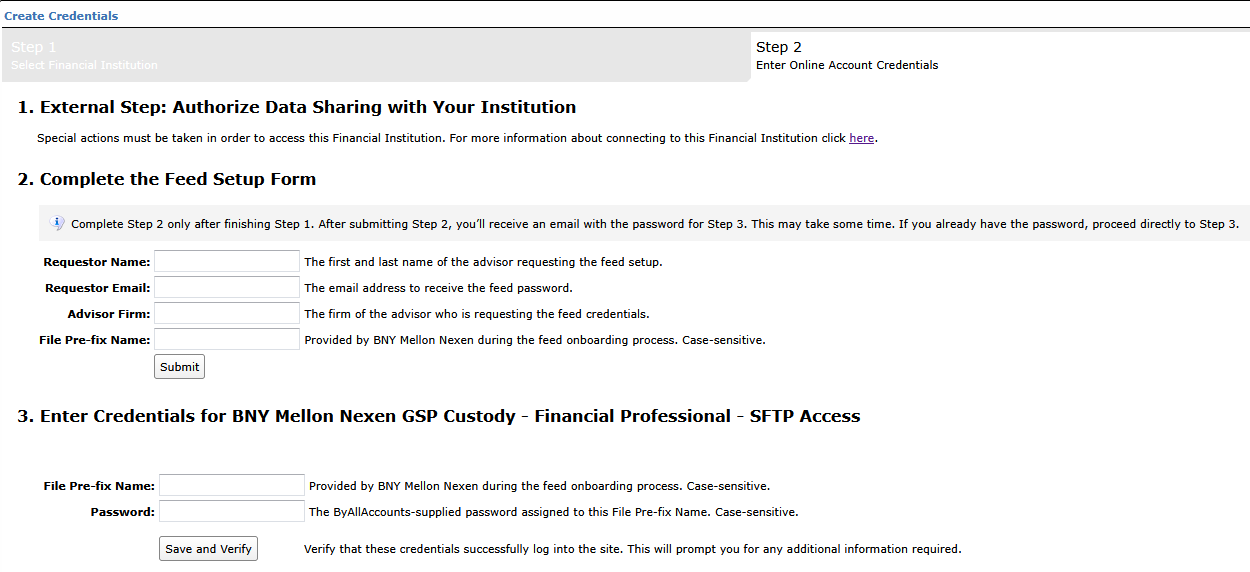
**Step 3:** Submit the Feed Setup Form in [AccountView](https://www.byallaccounts.net/BAAWebApp/BAALogin.html).

<HTMLBlock>{`
<details class="product-shot">
  <summary>Product screenshot</summary>
  <figure>
    <img
      src="https://files.readme.io/15afc4434e5a507dcdf790570fef31a0c40f42da177d2e26d4e0e4dcd21a8fa2-image.png"
      loading="lazy"
      style="max-width:100%; height:auto; border-radius:8px;"
    />
  </figure>
</details>
`}</HTMLBlock>

**Step 4:** ByAllAccounts will complete the final configurations and share the feed password.

<HTMLBlock>{`
<details>
  <summary>Feed password delivery details</summary>
  <table border="1" cellpadding="10" cellspacing="0" style="margin-top: 10px; border-collapse: collapse;">
    <tbody>
      <tr>
        <td>ByAllAccounts Password Email Subject</td>
        <td>BNY Mellon Nexen GSP Custody - Financial Professional - SFTP Access [ByAllAccounts SalesForce Case Number]</td>
      </tr>
      <tr>
        <td>ByAllAccounts Password Email Sender</td>
        <td>baa-service@alerts-morningstar.com</td>
      </tr>
      <tr>
        <td>ByAllAccounts SalesForce Case Number</td>
        <td>This is the reference number you will have received to track your request after completing step 3.</td>
      </tr>
    </tbody>
  </table>
</details>
`}</HTMLBlock>

**Step 5:** Enter feed credentials in [AccountView](https://www.byallaccounts.net/BAAWebApp/BAALogin.html) and aggregate accounts.

<HTMLBlock>{`
<details>
  <summary>Feed credential details</summary>
  <ul style="padding-top: 10px;">
    <li>Username: File Pre-fix Name</li>
    <li>Password: Shared by ByAllAccounts via email in step 4</li>
    <li style="font-style: italic;">If you have more than one File Pre-fix Name, you need to create multiple credentials. These will share the same password unless noted otherwise.</li>
  </ul>
</details>
`}</HTMLBlock>

<Callout icon="📘" theme="info">
  For detailed instructions on how to link accounts once you have your feed credentials, please refer to the following training video: [Linking Accounts and Credentials with Direct Feeds](https://outreach.morningstar.com/i/4fjs009jWdvBhkP56PO6eNkx6Gh5TPMyV0vRwdd8McBhK4500nLTSsoNjA8zMoHD6LzPLUSSIGNbD8GcgdNhD93V252N69DKmfPLUSSIGNO2B7aAFcWGnCFqzBUnGBd9CK28PLUSSIGNz9uCikaHS?signature=none)
</Callout>