

BNY Mellon Nexen GSP Custody - Financial Professional - SFTP Access
FI ID: 128662
Feed access personas: Financial Professional
Onboarding Instructions
Feed access pre-requisitesThis service uses BNY Mellon Nexen’s SFTP server to retrieve data for BNY Mellon Wealth Management and BNY Mellon Asset Servicing accounts on the Nexen GSP (Custody Accounting) system.
- GSP Custody Account Numbers are 6-8 digits
- They may appear with leading zeros (e.g., 123456 or 00123456).
- These accounts typically hold Global Currencies aside from USD
- This feed does not support BNY Mellon Nexen IAS Accounting data. Please refer to the instructions here.
Step 1: Contact your Customer Service Representative at BNY Mellon - Nexen to request daily file extracts for the direct feed with Morningstar ByAllAccounts, BNY Site Prefix: MBA01ERC.
-
Users must request the following reports and work with Nexen to configure report parameters* to ensure custody account data is aggregated correctly:
Client Type Report Name Report ID Output File Name Custody Custody Valuation ICUS0017 CLIENT PREFIX Custody Valuation.csv Custody Cash and Securities Transactions ICAS0011 CLIENT PREFIX Cash and Securities Transactions.csv Custody Settled Cash Balances ICAS0008 CLIENT PREFIX Settled Cash Balances.csv
Feed Setup Process at Nexen
- After the connection has been applied, BNY will schedule a meeting with the NEXEN user to assist with setup tasks within NEXEN. This may include the following:
- Completing any required BNY paperwork
- If advisors or third-party managers are not already authorized for read-only access at BNY, the account holder will need to provide approval. BNY will assist with the authorization process.
- Creating a new folder for reports
- Setting up an SFTP distribution profile
- Scheduling report delivery for 4:00 AM ET
- *Configuring custody account report parameters and settings:
- Custody Valuation
- As of Date = Settled Basis
- Short Term Investment Vehicles = Exclude
- Settled Cash Statement
- Transaction and Security Description: All Transaction and Security Descriptions
- Transaction Activity: Accounts with Activity Only
- Ensure "Include Free Transaction" is checked
- Ensure "Include Sweep Transaction" is checked
- Settled Cash Balances
- Grouping: Segregate Cash and Sweep
Step 2: BNY Mellon will confirm feed setup completion and provide the File Pre-fix Name directly to the Advisor.
- BNY Mellon should cc [email protected] to receive this confirmation.
Step 3: Submit the Feed Setup Form in AccountView.
Product screenshot
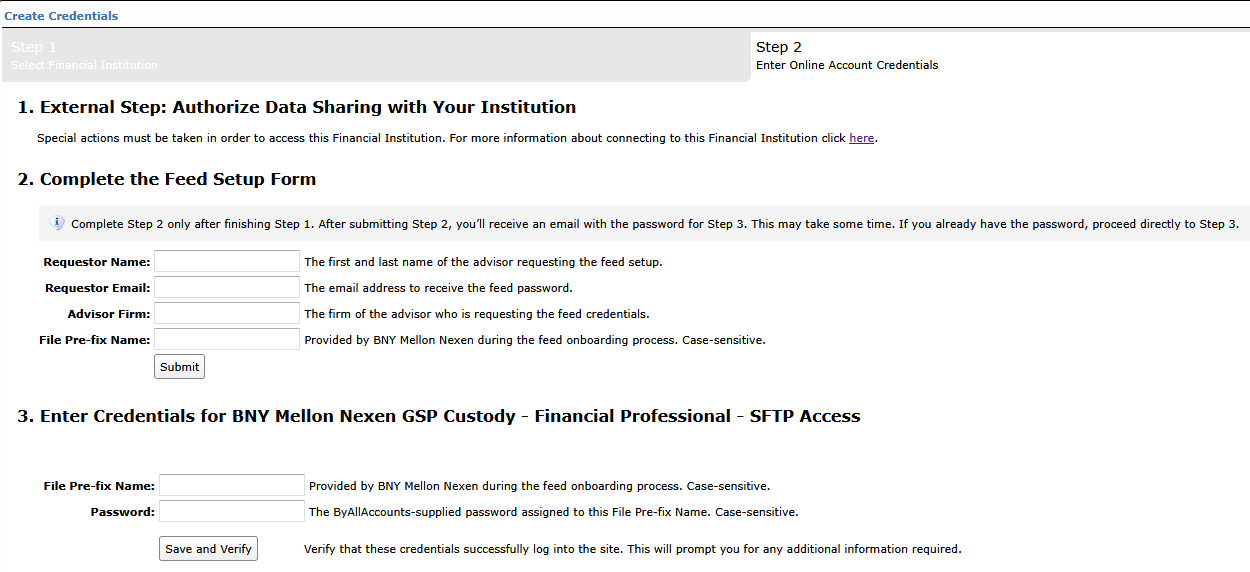
Step 4: ByAllAccounts will complete the final configurations and share the feed password.
Feed password delivery details
| ByAllAccounts Password Email Subject | BNY Mellon Nexen GSP Custody - Financial Professional - SFTP Access [ByAllAccounts SalesForce Case Number] |
| ByAllAccounts Password Email Sender | [email protected] |
| ByAllAccounts SalesForce Case Number | This is the reference number you will have received to track your request after completing step 3. |
Step 5: Enter feed credentials in AccountView and aggregate accounts.
Feed credential details
- Username: File Pre-fix Name
- Password: Shared by ByAllAccounts via email in step 4
- If you have more than one File Pre-fix Name, you need to create multiple credentials. These will share the same password unless noted otherwise.
For detailed instructions on how to link accounts once you have your feed credentials, please refer to the following training video: Linking Accounts and Credentials with Direct Feeds
Updated 7 days ago