

UBS Financial Services ConsultWorks - PowerUser - SFTP Access
FI ID: 109723
UBS is temporarily reviewing all new requests for PowerUser feed access via ByAllAccounts on a case‑by‑case basis until a revised vendor data access agreement is finalized. Please contact us to request access so we can coordinate directly with UBS. Onboarding may take longer than usual. Clients with questions or concerns can also reach out to their UBS Advisor at their branch.
Feed Eligibility
- Only UBS Wealth Management America (UBS WMA) accounts are eligible for this feed.
- UBS WMA account numbers consist of 7 alphanumeric characters.
Onboarding Instructions
Step 1: Email UBS at [email protected] and the UBS Client’s Branch Representative to request a new Child Routing Code and have your data configured for daily file extracts to be added to the Morningstar ByAllAccounts feed.
- The UBS Client’s Branch Representative must be involved to review this request, and including them will help avoid delays.
- Ensure you cc [email protected] in your request email for increased visibility.
- UBS will provide any necessary agreements for all applicable parties to complete and return.
- UBS PowerUser Download Agreement - Required to establish the feed setup
- UBS Data Sharing Authorization- Required to add accounts to a feed
- UBS requires a list of accounts to be added to the feed. This should be password-protected, with the password sent separately in a follow-up email.
- UBS will review the account list and confirm whether the accounts can be added or if the account owner needs to complete an additional authorization form, which UBS will provide and follow up on directly.
Step 2: Once the feed setup is complete, UBS will confirm and provide the Child Routing Code to the advisors/firms and Morningstar ByAllAccounts.
Step 3: Submit the Feed Setup Form in AccountView.
Product screenshot
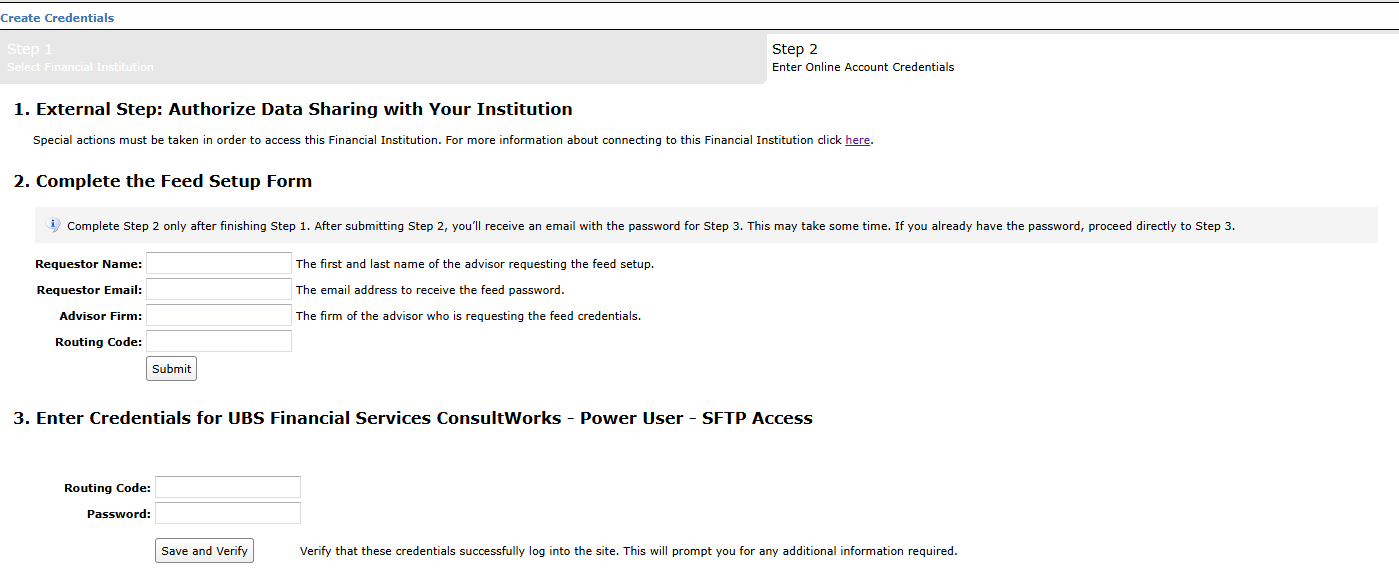
Step 4: ByAllAccounts will complete the final configurations and share the feed password.
Feed password delivery details
| ByAllAccounts Password Email Subject | ByAllAccounts/UBS Financial Services ConsultWorks - Power User - SFTP Access [ByAllAccounts SalesForce Case Number] |
| ByAllAccounts Password Email Sender | [email protected] |
| ByAllAccounts SalesForce Case Number | This is the reference number you will have received to track your request after completing step 3. |
Step 5: Enter feed credentials in AccountView and aggregate accounts.
Feed credential details
- Username: Routing Code
- Password: Shared by ByAllAccounts via email in step 4
- If you have more than one Advisor Profile, you need to create multiple credentials. These will share the same password unless noted otherwise.
For detailed instructions on how to link accounts once you have your feed credentials, please refer to the following training video: Linking Accounts and Credentials with Direct Feeds
Additional Information
To add more accounts to an existing feed with a Child Routing Code already in place, please reach out to UBS at [email protected] and include your UBS Client’s Branch Representative.
- The UBS Client’s Branch Representative must be involved to review this request, and including them will help avoid delays.
Updated 7 months ago