

Pershing SFTP - Northwestern Mutual
FI ID: 113301
Feed access personas: Advisors (IAR, B/D Reps), Firms (RIAs, B/D)
Onboarding Instructions
Feed access pre-requisites
- Users must be registered with Pershing and have established Investment Professional (IP) Numbers.
- While individual accounts may be released to ByAllAccounts through Northwestern Mutual, we use the IP Number to enable account access.
- All accounts associated with a given IP Number will be accessible.
Step 1: Advisors and firms must email [email protected]
to request that a feed be established to deliver their data to the Morningstar ByAllAccounts feed (Destination ID: PL4) for data aggregation purposes.
Request Details
- Once a data feed is established with Northwestern Mutual, the requestor receives a contract and closing instructions that outline:
- Process for adding account names and numbers to the feed
- Account-owner Authorization Form and a Customer Account Confidentiality Agreement, as applicable
- Advisor/Firm must send completed documents to the NMISSYSTEMS team at [email protected].
- Please request NMISSYSTEMS to confirm the Investment Professional (IP) Number(s) associated to the accounts being added once completed with [email protected] copied.
Step 2: Once completed, Northwestern Mutual will confirm and provide the associated IP Number (used to configure data in ByAllAccounts system).
- Please ensure [email protected] is copied to receive this.
Step 3: Submit the Feed Setup Form in AccountView.
Product screenshot
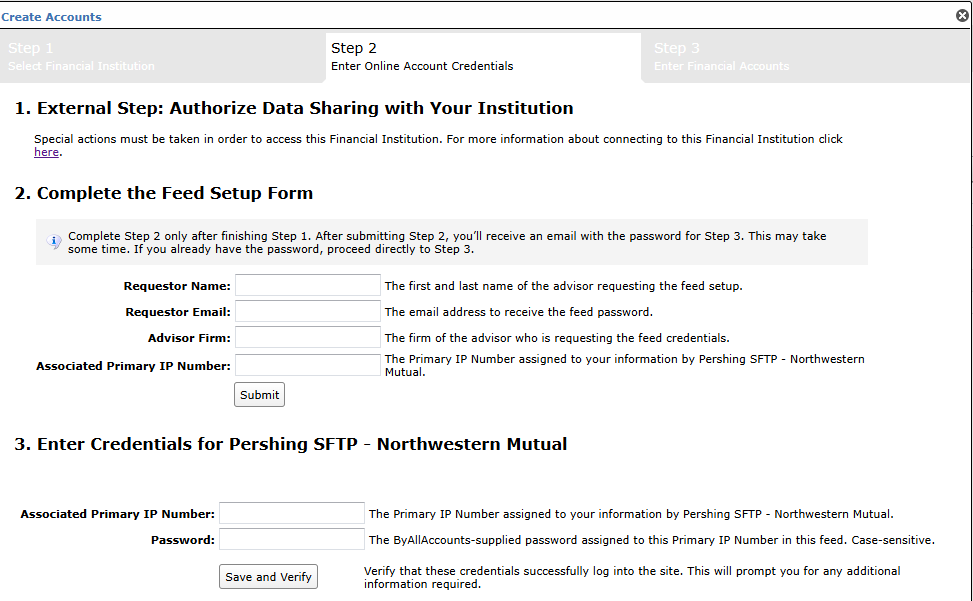
Step 4: ByAllAccounts will complete the final configurations and share the feed password.
Feed password delivery details
| ByAllAccounts Password Email Subject | ByAllAccounts/Pershing SFTP - Northwestern Mutual [ByAllAccounts SalesForce Case Number] |
| ByAllAccounts Password Email Sender | [email protected] |
| ByAllAccounts SalesForce Case Number | This is the reference number you will have received to track your request after completing step 3. |
Step 5: Enter feed credentials in AccountView and aggregate accounts.
Feed credential details
- Username: Associated Primary IP Number
- Password: Shared by ByAllAccounts via email in step 4
- If you have more than one Associated Primary IP Number, you need to create multiple credentials. These will share the same password unless noted otherwise.
For detailed instructions on how to link accounts once you have your feed credentials, please refer to the following training video: Linking Accounts and Credentials with Direct Feeds
Additional Feed Information
- To remove and/or add accounts from existing data feeds, Advisor/Firms should submit requests to [email protected].
- Northwestern Mutual will not process requests submitted by vendors. All requests must come directly from the firm.
- Northwestern Mutual cannot disclose account or advisor information to a vendor unless the accounts are already on the firm’s data feed and the request comes directly from the firm via email.
Updated 8 months ago