

United Community Bank - SFTP Access
FI ID: 112887, formerly Seaside National Bank & Trust (Morningstar SFTP)
Feed access personas: Advisors/Financial Professionals
Onboarding Instructions
Step 1: Email Ben Johnson [email protected] at United Community Bank and request to have your accounts added to the Morningstar ByAllAccounts feed.
- Ensure you cc [email protected] on the request.
Step 2: Once the setup is complete, United Community Bank will provide you with your assigned Authorization ID.
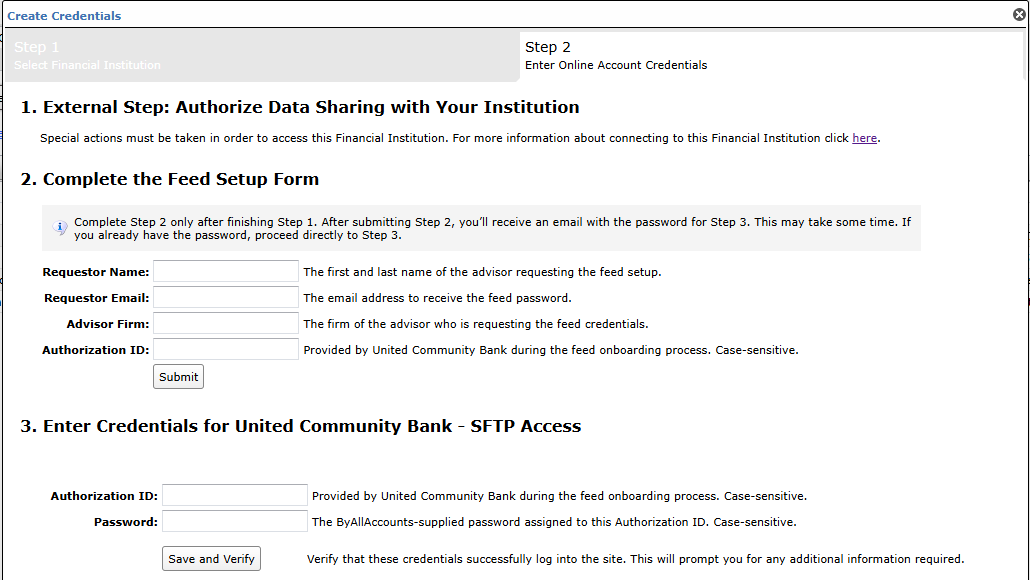
Step 3: Submit the Feed Setup Form in AccountView.
Product screenshot
Step 4: ByAllAccounts will complete the final configurations and share the feed password.
Feed password delivery details
| ByAllAccounts Password Email Subject | ByAllAccounts/United Community Bank - SFTP Access [ByAllAccounts SalesForce Case Number] |
| ByAllAccounts Password Email Sender | [email protected] |
| ByAllAccounts SalesForce Case Number | This is the reference number you will have received to track your request after completing step 3. |
Step 5: Enter feed credentials in AccountView and aggregate accounts.
Feed credential details
- Username: Authorization ID
- Password: Shared by ByAllAccounts via email in step 4
- If you have more than one Authorization ID, you need to create multiple credentials. These will share the same password unless noted otherwise.
For detailed instructions on how to link accounts once you have your feed credentials, please refer to the following training video: Linking Accounts and Credentials with Direct Feeds
Updated about 2 hours ago