

Morgan Stanley - SFTP Access
FI ID: 116847
Feed access personas: Money Managers, Individual Investors
Onboarding Instructions
Feed access pre-requisitesFeed Eligibility
- Money managers working with the Managed Product Team
- Individual investors who are clients of Morgan Stanley Wealth Management, Morgan Stanley Retail, or E*Trade
- Accounts with 9 or 12 digit numeric account numbers only (no letters)
Ineligible Accounts
- Morgan Stanley or E*Trade Shareworks and 401(k) plans
- Accounts with alphanumeric account numbers or account numbers that are not exactly 9 or 12 digits
Step 1: Contact the Morgan Stanley (MS) team to request your data be added to the Morningstar ByAllAccounts feed.
Managed Accounts
- Managed Accounts Data Feed Users must email the MS IRG – 3rd Party Manager Solutions team at [email protected] to request inclusion on the Morningstar ByAllAccounts feed.
- The MS IRG – 3rd Party Manager Solutions team will provide the money manager with a MS Data Feed Application to complete and return.
- Once the completed application is received, the MS IRG team will contact the money manager to confirm the start date for file delivery to Morningstar ByAllAccounts.
- The MS IRG – 3rd Party Manager Solutions team will then assign the money manager a Client ID (manager code).
Retail Accounts/Individual Investors
- Email the GWM Data Feeds Team at [email protected] to request inclusion in the Morningstar ByAllAccounts feed.
- Morgan Stanley may require the following:
- Service Provider/Vendor/3rd Party/Aggregator Name: Morningstar ByAllAccounts
- Primary Contact: Custodial Operations Team/Nicole Lahat
- Phone Number: 866-856-4951
- Email: [email protected]
Step 2: Once completed, Morgan Stanley will confirm and provide Client ID(s) that is required to configure data at Morningstar ByAllAccounts.
Step 3: Submit the Feed Setup Form in AccountView.
Product screenshot
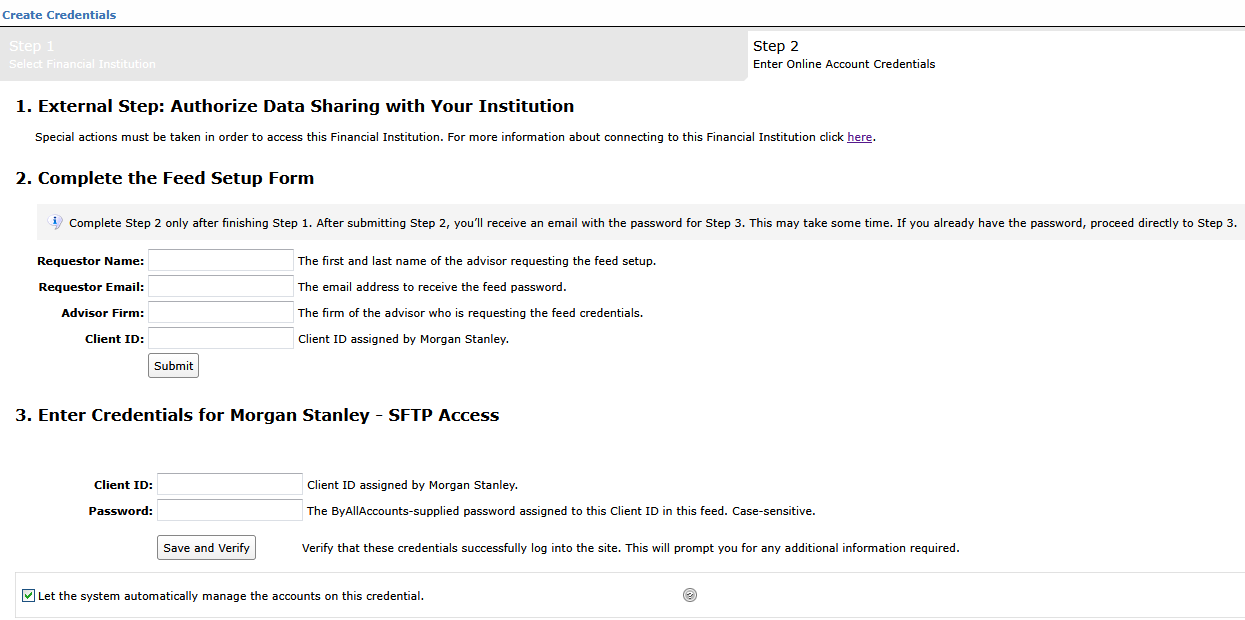
Step 4: ByAllAccounts will complete the final configurations and share the feed password.
Feed password delivery details
| ByAllAccounts Password Email Subject | ByAllAccounts/Morgan Stanley - SFTP Access [ByAllAccounts SalesForce Case Number] |
| ByAllAccounts Password Email Sender | [email protected] |
| ByAllAccounts SalesForce Case Number | This is the reference number you will have received to track your request after completing step 3. |
Step 5: Enter feed credentials in AccountView and aggregate accounts.
Feed credential details
- Clinet ID: assigned by Morgan Stanley
- Password: Shared by ByAllAccounts via email in step 4
- If you have more than one Client ID, you need to create multiple credentials. These will share the same password unless noted otherwise.
For detailed instructions on how to link accounts once you have your feed credentials, please refer to the following training video: Linking Accounts and Credentials with Direct Feeds
Additional Information
Users can contact the same Morgan Stanley team that assisted with their feed setup for any questions or support.
Updated 3 months ago