

RBC US Wealth Management Money Managers - SFTP
FI ID: 127736
Feed access pre-requisites
- Eligibility for this feed must be confirmed by your RBC representative.
- This feed supports accounts with account numbers that begin with 3.
- This connection is for Money Managers. Individual Investors should use the RBC US Wealth Management Investor - SFTP connection.
Onboarding Instructions
Step 1: The requestor should contact their RBC Representative to initiate the request to establish the Morningstar ByAllAccounts feed.
Contact details
- Money managers on RBC’s platform should contact the RBC SMA/UMA Product Management Team at [email protected].
- Money managers not on RBC’s platform, and other outside parties, should initiate the request through their RBC branch or submit questions to [email protected].
- Please cc [email protected] in your request email for increased visibility.
Step 2: RBC will set up the data under a new Folder ID and provide a confirmation to the requestor and ByAllAccounts.
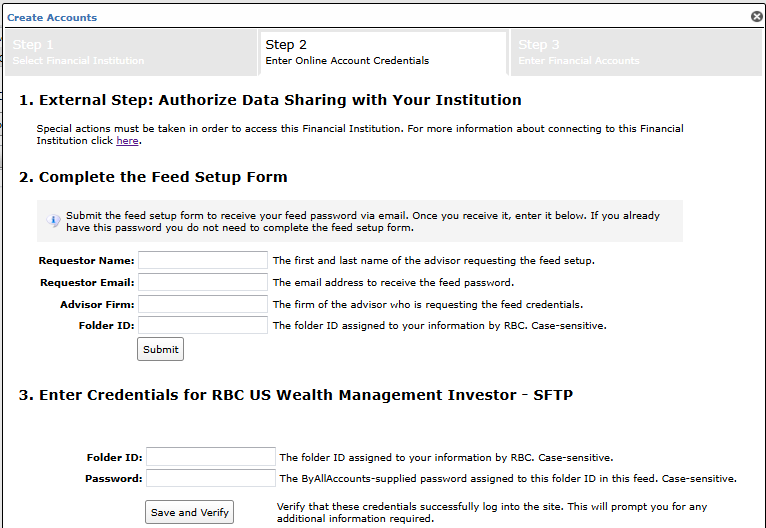
Step 3: Submit the Feed Setup Form in AccountView.
Product screenshot
Step 4: ByAllAccounts will complete the final configurations and share the feed password.
Feed password delivery details
| ByAllAccounts Password Email Subject | ByAllAccounts/RBC US Wealth Management Money Managers - SFTP [ByAllAccounts SalesForce Case Number] |
| ByAllAccounts Password Email Sender | [email protected] |
| ByAllAccounts SalesForce Case Number | This is the reference number you will have received to track your request after completing step 3. |
Step 5: Enter feed credentials in AccountView and aggregate accounts
Feed credential details
- Username: Folder ID
- Password: Shared by ByAllAccounts via email in step 4
- Use of automatic account management (AAM) is recommended with this feed. You can do so by selecting the check box that reads "Let the system automatically manage the accounts on this credential." right below the credential entry fields in AccountView.
- If you have more than one Folder ID, you need to create multiple credentials. These will share the same password unless noted otherwise.
For detailed instructions on how to link accounts once you have your feed credentials, please refer to the following training video: Linking Accounts and Credentials with Direct Feeds
Additional Feed Information
- Once feed setup is complete, new accounts should link to the existing feed configuration. If there are any issues with new accounts, please contact your RBC Representative and/or [email protected].
- The process can up to two weeks.
Updated 10 months ago
Did this page help you?