

Pacific Life Insurance - SFTP Access
FI ID: 129749, formerly known as Pacific Life Insurance - SFTP
Feed access personas: Advisor (IARs, BD reps), Firm (RIAs, BDs)
Onboarding Instructions
Feed access pre-requisitesThis feed is for Firms and Advisors with managing discretion of Life Insurance accounts.
Please note: The current daily file delivery schedule for this feed does not align with our aggregation processing timeline, preventing the data from being included in our daily aggregation processes. Therefore, data is aggregated on a T+2 schedule, which will result in "stale data" messages as part of normal processing.
Step 1: Reach out to Pacific Life Insurance and request that your accounts be added to the Morningstar ByAllAccounts feed.
Step 2: Once the setup is complete, Pacific Life will provide you with your assigned Unique ID.
Step 3: Submit the Feed Setup Form in AccountView.
Product screenshot
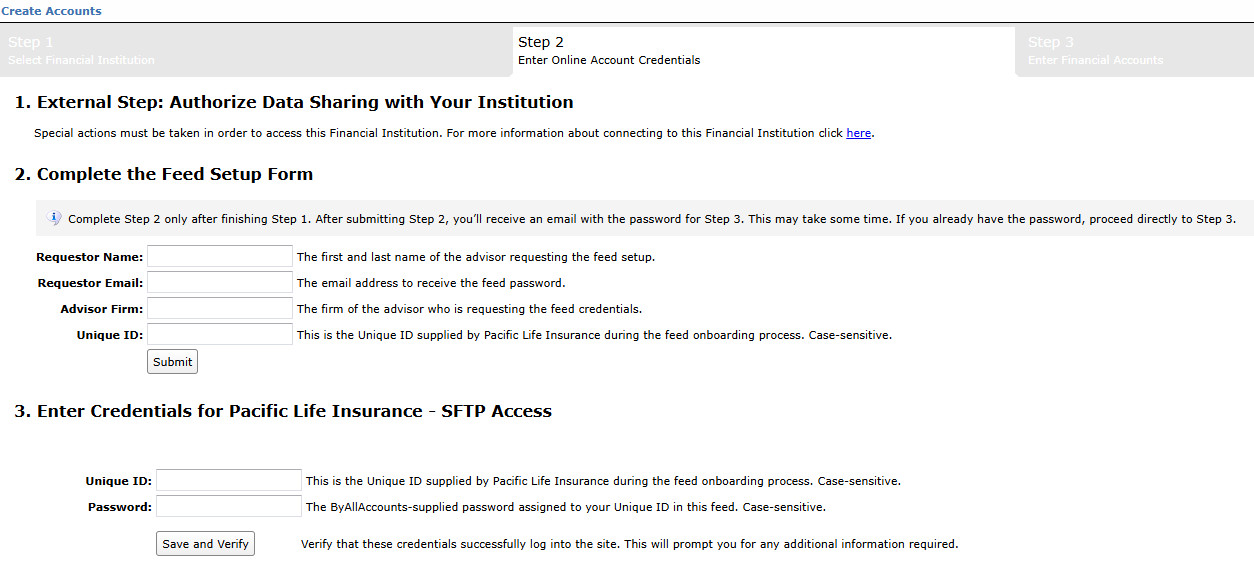
Step 4: ByAllAccounts will complete the final configurations and share the feed password.
Feed password delivery details
| ByAllAccounts Password Email Subject | ByAllAccounts/Pacific Life Insurance - SFTP Access [ByAllAccounts SalesForce Case Number] |
| ByAllAccounts Password Email Sender | [email protected] |
| ByAllAccounts SalesForce Case Number | This is the reference number you will have received to track your request after completing Step 3. |
Step 5: Enter your feed credentials in AccountView to aggregate your accounts.
Feed credential details
- Username: Unique ID
- Password: Shared by ByAllAccounts via email in Step 4
- If you have more than one Unique ID, you need to create multiple credentials. These will share the same password unless noted otherwise.
For detailed instructions on how to link accounts once you have your feed credentials, please refer to the following training video: Linking Accounts and Credentials with Direct Feeds
Updated 3 months ago