

BTIG LLC - Brokerage - Goldman Sachs SFTP
FI ID: 116780, formally known as BTIG LLC - Brokerage - SFTP
Onboarding Instructions
Feed access pre-requisitesThis Institution is a Goldman Sachs feed facilitated by BTIG. Advisors/Firms must contact BTIG to request feed setup.
Step 1: Email BTIG at [email protected] and request to have your firm’s accounts added to the Morningstar ByAllAccounts data feed. BTIG will coordinate with Goldman Sachs to set up the feed and provide a File Name/Acronym for the Advisor/Firm.
Contact details
- Contact: Greer Hogan - [email protected]
- Send to the Attention of Greer Hogan and Eryn Morgenlander.
- Ensure you cc [email protected] in your request email.
- In your email to BTIG, please include the following file codes that you would like added to the feed:
- 09.2
- 32.2
- 32.0
- 02.0
- 33.0
- 01.1
Step 2: Goldman Sachs will send the following information to [email protected].
- File Name/Acronym
- Advisor/Firm Name
- Contact Name
Step 3: Submit the Feed Setup Form in AccountView.
Product screenshot
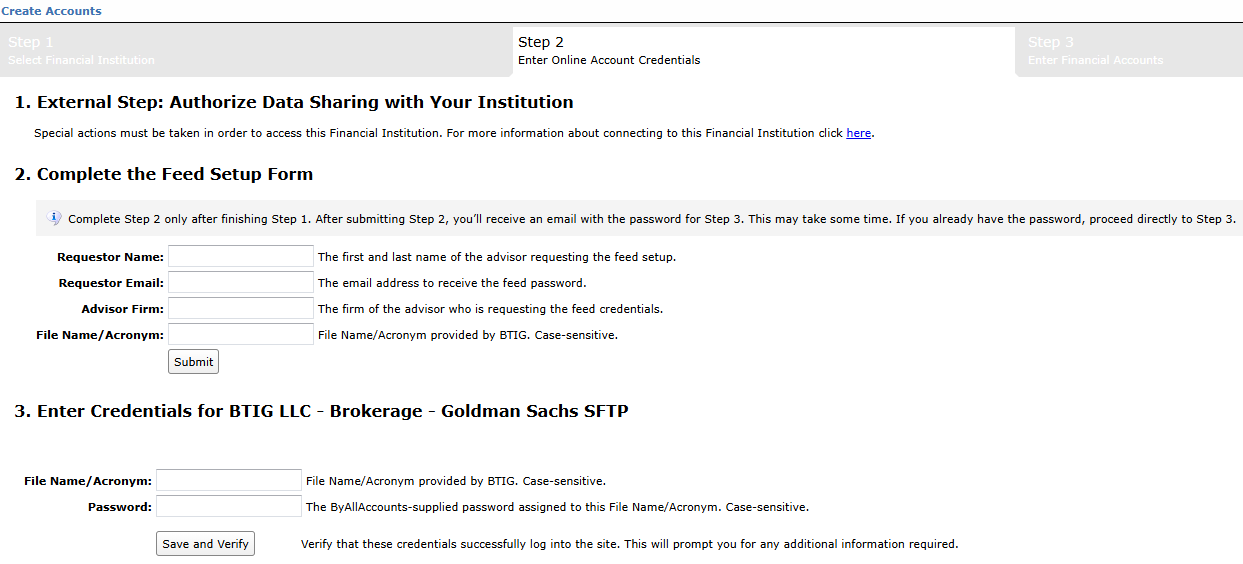
Step 4: ByAllAccounts will email the feed password to the address provided. The password and the File Name/Acronym provided by BTIG is required for setting up aggregation in AccountView.
Feed password delivery details
| ByAllAccounts Password Email Subject | ByAllAccounts/BTIG LLC - Brokerage - Goldman Sachs SFTP [ByAllAccounts SalesForce Case Number] |
| ByAllAccounts Password Email Sender | [email protected] |
| ByAllAccounts SalesForce Case Number | This is the reference number you will have received to track your request after completing step 3. |
Step 5: Enter feed credentials in AccountView and aggregate accounts.
Feed credential details
- Username: File Name/Acronym
- Password: Shared by ByAllAccounts via email in step 4
- If you have more than one File Name/Acronym, you need to create multiple credentials. These will share the same password unless noted otherwise.
Updated 2 days ago