

Iowa State Bank - SFTP Access
FI ID: 97082, formerly known as Iowa State Bank - Trust
Feed access personas: Advisors/Financial Professionals
Onboarding Instructions
Step 1: Contact your Iowa State Bank Representative and request to have your accounts added to the Morningstar ByAllAccounts feed.
- Ensure you cc [email protected] and Danielle Gogan [email protected] on the request.
Step 2: Once the setup is complete, Iowa State Bank will provide you with your assigned Office Code.
Step 3: Submit the Feed Setup Form in AccountView.
Product screenshot
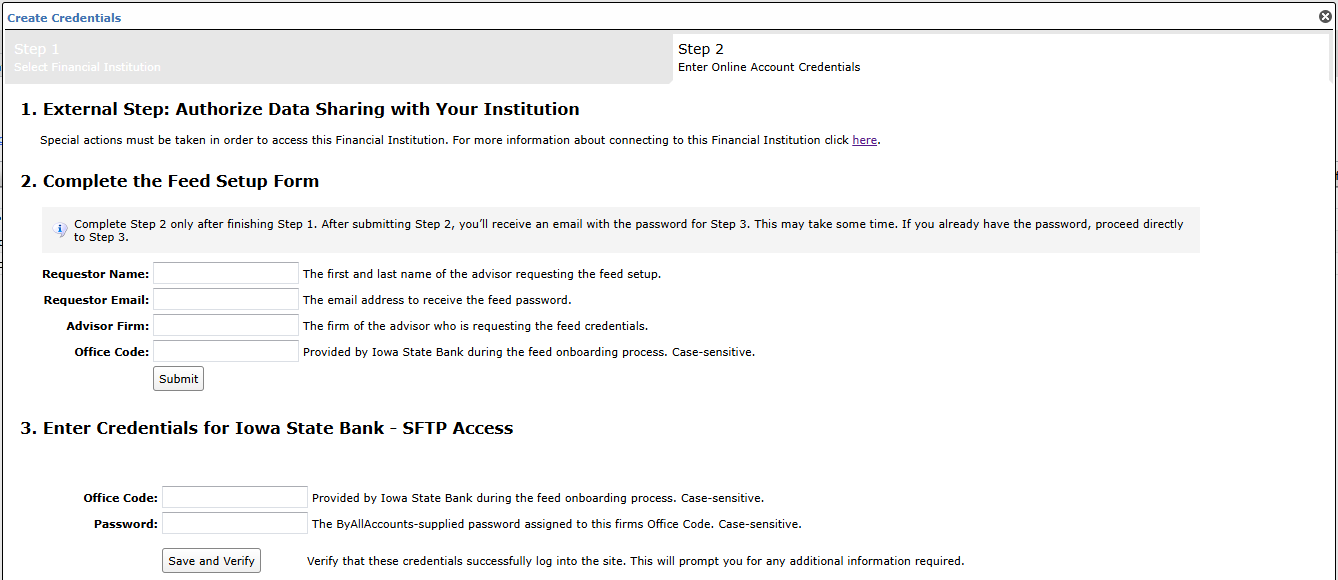
Step 4: ByAllAccounts will complete the final configurations and share the feed password.
Feed password delivery details
| ByAllAccounts Password Email Subject | ByAllAccounts/Iowa State Bank - SFTP Access [ByAllAccounts SalesForce Case Number] |
| ByAllAccounts Password Email Sender | [email protected] |
| ByAllAccounts SalesForce Case Number | This is the reference number you will have received to track your request after completing step 3. |
Step 5: Enter feed credentials in AccountView and aggregate accounts.
Feed credential details
- Username: Iowa State Bank - SFTP Access Office Code
- Password: Shared by ByAllAccounts via email in step 4
- If you have more than one Office Code, you need to create multiple credentials. These will share the same password unless noted otherwise.
For detailed instructions on how to link accounts once you have your feed credentials, please refer to the following training video: Linking Accounts and Credentials with Direct Feeds
Updated 5 months ago