

DAZL - SFTP - Commingled Feed
FI ID: 111285
Onboarding Instructions
Step 1: Submit an enrollment form to request your data be added to the DAZL feed prepared for Morningstar ByAllAccounts.
Digital form instructions
- The enrollment form is available on the DAZL site: https://ep-gf.bnymellon.com/nsccstatic/login.html.
- There is no login required; the forms are at the bottom of the page listed under 'DAZL users click below for Enrollment Forms' where you can select the appropriate hyperlink.
- All requests must be filled out completely, including a sample fund account for all Asset Managers you want access to.
- Select 'Morningstar Offices' as your software product.
- Please add a comment in the 'Additional/Special Instruction' section: "Morningstar is a data aggregator that will be accepting files on our behalf. Include Daily Full Position and Account records."
Step 2: DAZL will send a confirmation to both the Advisor/Firm and Morningstar ByAllAccounts once setup is complete to provide the 'DAZL INT ID' that is required to configure data in our system.
Step 3: Submit the Feed Setup Form in AccountView.
Product screenshot
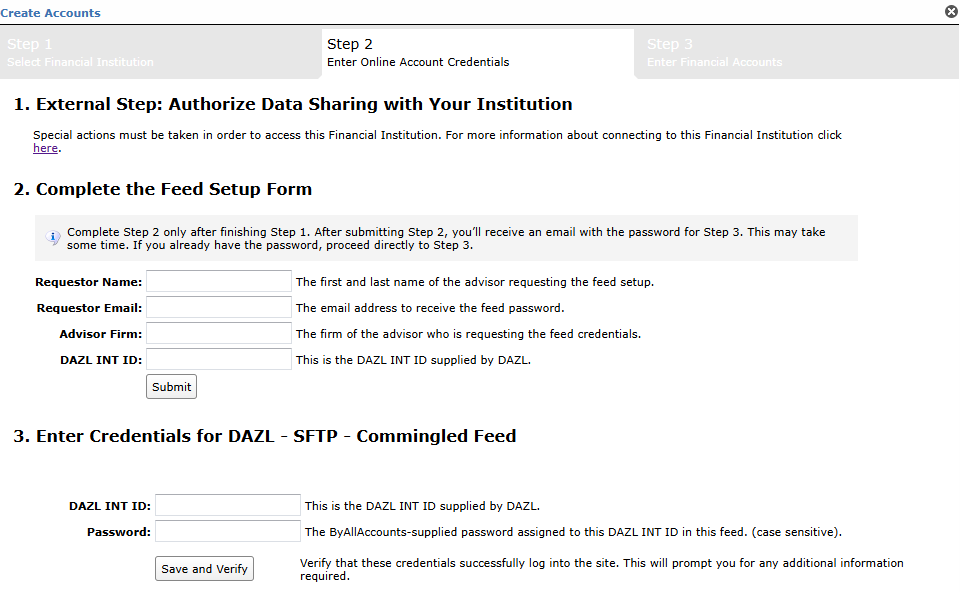
Step 4: ByAllAccounts will complete the final configurations and share the feed password.
Feed password delivery details
| ByAllAccounts Password Email Subject | ByAllAccounts/DAZL - SFTP - Commingled Feed [ByAllAccounts SalesForce Case Number] |
| ByAllAccounts Password Email Sender | [email protected] |
| ByAllAccounts SalesForce Case Number | This is the reference number you will have received to track your request after completing step 3. |
Step 5: Enter feed credentials in AccountView and aggregate accounts.
Feed credential details
- Username: DAZL INT ID
- Password: Shared by ByAllAccounts via email in step 4
- If you have more than one DAZL INT ID, you need to create multiple credentials. These will share the same password unless noted otherwise.
NOTE: Not all Fund Companies provide Position and Account records (Constellation Trust Codes 4CC and 4CO do not provide them). The DAZL INT ID is set to a monthly refresh; if there is no activity, positions and accounts will not be in the file.
For detailed instructions on how to link accounts once you have your feed credentials, please refer to the following training video: Linking Accounts and Credentials with Direct Feeds
Updated 10 days ago